First run with Solmara Lab
Solmara Lab is a standalone Registry Stack adopter demo for the fictional Republic of Solmara: six
Registry Relay instances and four
Registry Notary instances wired over generated synthetic data
into one topology, alongside a citizen portal and a public Visitor’s Center. This tutorial brings
the topology up with the lab’s just recipes, verifies it with the smoke suite, and calls a Notary
evaluation route directly so you touch the protected API surface, not only the portal.
This tutorial uses synthetic data and local demo credentials. Do not use the generated local keys in production.
If you only want the shortest hosted path before running anything locally, start with the
Quickstart instead. For a standalone local project generated from your
own data, use the registryctl tutorials:
run a protected registry API or
evaluate a claim with Registry Notary. Clone Solmara Lab when you
want the full multi-service country demo.
Prerequisites
Section titled “Prerequisites”- Docker with Compose v2.
just upandjust downrundocker compose ... up -d --buildanddocker compose ... down. - The
justcommand runner. Every step in this tutorial is ajustrecipe. uv.just generateruns the fixture generator withuv run python -m solmara_lab.generate.python3andopensslon your PATH.just generatealso runsscripts/gen-secrets.pydirectly, a plain Python script that shells out toopensslfor local TLS and signing key material.pnpm11.3.0, matching thepackageManagerfield the portal and Visitor’s Center pin. Runcorepack enablefirst ifpnpmis not already on your PATH.git.curl, for the direct Notary evaluation call and the verify commands.
Get the repository
Section titled “Get the repository”Solmara Lab is a standalone repository, not a directory inside the Registry Stack monorepo. Clone it and install its dependencies:
git clone https://github.com/registrystack/solmara-labcd solmara-labjust setupjust setup installs the root and generator Python environments with uv sync, and installs the
portal and home (Visitor’s Center) Node dependencies with pnpm install --frozen-lockfile.
Run these from your Solmara Lab checkout, in order.
-
Generate the deterministic fixtures, local demo secrets, and Postgres TLS material:
Terminal window just generate -
Build the local images and start the topology in the background:
Terminal window just up -
Run the smoke suite, the primary verification:
Terminal window just smoke
just generate also writes .env, a Compose-required file of local demo credentials. Skipping it
is the most common first failure; see the troubleshooting table. just up builds the portal,
home, and scenario-runner images locally and pulls the digest-pinned Relay and Notary images;
expect the first run to take most of this tutorial’s time. just smoke runs story-preview checks
plus, by default, live checks against the running Relay, Notary, and portal services.
What is running
Section titled “What is running”just up starts 16 long-running services: six purpose-scoped Relay instances, one per Solmara
ministry authority, four purpose-scoped Notary instances, the citizen portal, the public Visitor’s
Center, a static metadata publisher, a scenario-runner service that backs the portal’s guided
demos, Postgres, and Redis.
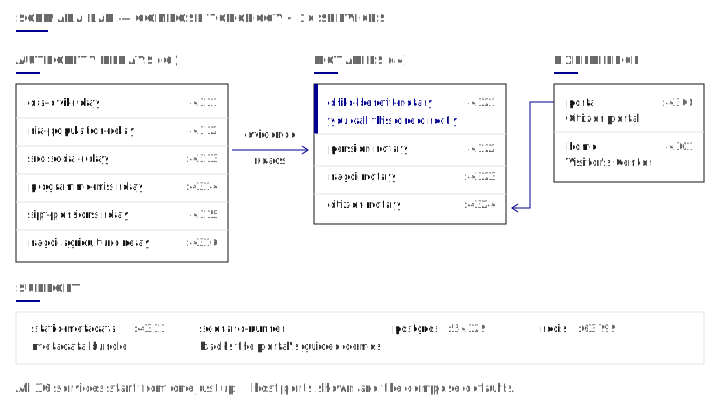
The services this tutorial calls directly:
| Service | Host port | Role |
|---|---|---|
portal | 4300 | Citizen portal: a SvelteKit application wired to the citizen Notary. |
home | 4301 | Visitor’s Center: the lab’s public tour, including an Engineer door. |
child-benefit-notary | 4321 | Notary for the birth-to-child-benefit journey; you call its evaluation route directly. |
static-metadata | 4331 | Unauthenticated multi-authority metadata bundle. |
The other six Relay instances, three Notary instances, Postgres, and Redis back the pension and farmer-voucher journeys and the portal’s own evidence calls; this tutorial does not call them directly. The topology figure shows the full port map.
Each instance publishes its rendered API reference at /docs, a route that is always public, and
its raw /openapi.json, public here because every Relay and Notary configuration in this lab sets
openapi_requires_auth: false. This is the same route pattern documented in
Evaluate a claim with Registry Notary.
See it: the citizen portal and the Visitor’s Center
Section titled “See it: the citizen portal and the Visitor’s Center”Open the citizen portal at http://127.0.0.1:4300. It is a SvelteKit application backed by the citizen Notary and the civil, social, and agriculture Relay instances. Sign in with one of the portal’s fixed demo personas to see a resident’s own view of the evidence flows this tutorial calls directly.
Open the Visitor’s Center at http://127.0.0.1:4301. It is Solmara Lab’s
public tour, organized as three doors: visit as a citizen, as a relying agency running a guided
story, or as an engineer. Scroll to the Engineer door section. It republishes the same four
synthetic Notary tokens this tutorial’s .env generates: child-benefit-notary, pension-notary,
nagdi-notary, and citizen-notary. They appear as ready-made copy-as-curl examples, including
the evaluation call you make by hand next.
Call a Notary evaluation route directly
Section titled “Call a Notary evaluation route directly”The birth-to-child-benefit journey is one of the lab’s guided stories. Its positive fixture is Mateo
Santos, Solmara UIN 2300010248: a child whose birth is registered, who is under five, whose
household falls below the poverty threshold, and who is not already enrolled.
Load the generated Notary token for this journey from .env, then evaluate the same four claims
the birth-to-child-benefit story checks:
export CHILD_BENEFIT_NOTARY_TOKEN="$(grep -m1 '^CHILD_BENEFIT_NOTARY_TOKEN=' .env | cut -d= -f2-)"curl -sS -X POST \ -H "x-api-key: $CHILD_BENEFIT_NOTARY_TOKEN" \ -H "Data-Purpose: https://id.registrystack.org/solmara/purpose/child-benefit-review" \ -H "Content-Type: application/json" \ -H "Accept: application/vnd.registry-notary.claim-result+json" \ -d '{ "target": {"type": "Person", "identifiers": [{"scheme": "solmara_uin", "value": "2300010248"}]}, "claims": ["birth-is-registered", "child-age-under-5", "household-below-poverty-threshold", "not-already-enrolled"], "disclosure": "predicate", "format": "application/vnd.registry-notary.claim-result+json" }' \ http://127.0.0.1:4321/v1/evaluationsThe Notary returns 200 OK with all four claims satisfied. The important fields look like this;
other fields are omitted:
{ "results": [ { "claim_id": "birth-is-registered", "satisfied": true, "value": true }, { "claim_id": "child-age-under-5", "satisfied": true, "value": true }, { "claim_id": "household-below-poverty-threshold", "satisfied": true, "value": true }, { "claim_id": "not-already-enrolled", "satisfied": true, "value": true } ]}The x-api-key header carries the caller’s credential. Data-Purpose declares why the caller is
asking, and the Notary’s configuration allows this token to ask only under the
child-benefit-review purpose. The disclosure: predicate request means the response discloses a
true or false satisfaction per claim, never the underlying civil, population, social, or programme
registry row the Notary read to answer it. The Notary can also issue a signed
SD-JWT verifiable credential (SD-JWT VC) for this same eligibility
claim set; that holder-bound issuance flow is out of scope for this tutorial. See
Registry Notary for the credential issuance contract.
Verify
Section titled “Verify”just smoke (step 3) is the authoritative check. These commands confirm its artifacts are on
disk, and reproduce the call from
Call a Notary evaluation route directly in a single
command so it can run without a shell variable.
ls output/smoke/story-previews.jsonls output/smoke/relay-sources.jsonls output/smoke/portal-compose.jsoncurl -sS -X POST -H "x-api-key: $(grep -m1 '^CHILD_BENEFIT_NOTARY_TOKEN=' .env | cut -d= -f2-)" -H "Data-Purpose: https://id.registrystack.org/solmara/purpose/child-benefit-review" -H "Content-Type: application/json" -H "Accept: application/vnd.registry-notary.claim-result+json" -d '{"target":{"type":"Person","identifiers":[{"scheme":"solmara_uin","value":"2300010248"}]},"claims":["birth-is-registered","child-age-under-5","household-below-poverty-threshold","not-already-enrolled"],"disclosure":"predicate","format":"application/vnd.registry-notary.claim-result+json"}' http://127.0.0.1:4321/v1/evaluations | python3 -c "import json, sys; data = json.load(sys.stdin); got = {r['claim_id']: r['satisfied'] for r in data['results']}; expected = ['birth-is-registered', 'child-age-under-5', 'household-below-poverty-threshold', 'not-already-enrolled']; raise SystemExit(0 if len(data['results']) == 4 and all(got.get(c) is True for c in expected) else 1)"What you built
Section titled “What you built”You brought up 16 Relay, Notary, portal, and supporting services on your laptop from a single
just up, and the smoke suite verified the topology. You then called the child benefit Notary
directly and watched it return four satisfied predicates for Mateo Santos without exposing the
civil, population, social, or programme registry rows it read to answer. The same synthetic token
and evaluation call are also visible through the Visitor’s Center’s Engineer door, so you can
confirm what you ran by hand against what the lab publishes.
- Quickstart: the shortest hosted path, no install needed.
- Get a verifiable credential from the hosted lab: watch Registry Notary issue a signed credential in the browser.
- When to use Registry Stack: decide whether Relay, Notary, or both fit your integration.
- Registry Relay: route reference, auth scopes, and configuration guide.
- Registry Notary: claim configuration, disclosure modes, and credential issuance.
Troubleshooting
Section titled “Troubleshooting”| Symptom | Cause | Resolution |
|---|---|---|
just up fails immediately with required variable ... is missing a value: .env not loaded; run just gen-secrets once, then just up | just generate (or just gen-secrets) never ran, so .env does not exist. | Run just generate, then just up again. |
docker compose reports a port already allocated | Another process on your machine already holds one of the lab’s ports: 4300, 4301, 4311 through 4316, 4321 through 4324, 4331, 54329, or 63799. | Stop the conflicting process, or set the matching SOLMARA_*_PORT environment variable (for example SOLMARA_PORTAL_PORT=4400) before just up. |
command not found: uv or command not found: pnpm | A required tool is not on your PATH. | Install uv, or run corepack enable for pnpm, then run just setup again. |
docker compose ps -a lists lab containers you did not start | The lab derives a per-checkout Compose project name (solmara-lab- plus a hash of the checkout path), so two checkouts never share a project. Leftover containers come from a lab version that used the shared project name solmara-lab. | Inspect the old project with docker compose -p solmara-lab ps, then remove it with docker compose -p solmara-lab down (add -v only if you also want its volumes deleted). |
| The Relay and Notary containers start slowly or show high CPU on Apple Silicon | The pinned Relay and Notary images publish linux/amd64 only, so Compose runs them under emulation. | Expected. Allow extra time on the first just up; later runs are faster once the images are cached. |
The first just up appears to hang | The first run pulls the pinned Relay and Notary images and builds the portal, home, and scenario-runner images locally. | Let it finish; do not interrupt it. |
Cleanup
Section titled “Cleanup”Stop the containers:
just downjust down runs docker compose ... down, keeping the Postgres data volume and the Relay and
Notary state volumes, so a later just up resumes with the same data. To also remove the
volumes, run just reset instead; that is the lab’s documented clean slate: rerun
just generate and just up for a fresh topology.